
Download Drdshe for Android
Install the official APK for push notifications, voice messages, and the full mobile experience — with step-by-step screenshots for Play Protect.
Official APK from drdshe.com only. Play Protect may appear because the app isn’t on Google Play yet.
Five steps and you’re chatting
Follow these screens on your phone. They show the Play Protect flow you may see when installing an APK from outside the store.
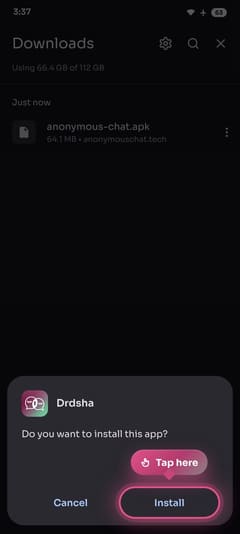
Download & tap Install
On your Android phone, tap “Download Android app”. Open anonymous-chat.apk from your Downloads folder, then tap Install.
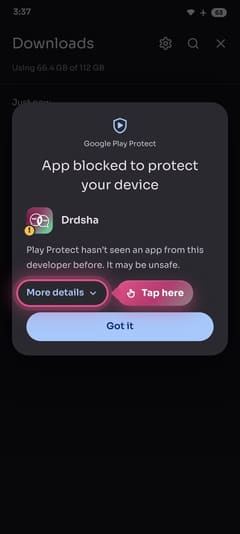
Play Protect → More details
If Google Play Protect says the app is blocked, don’t worry — this is common for apps that aren’t on Google Play yet. Tap More details at the bottom of the dialog.
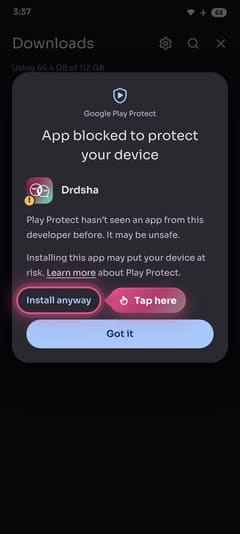
Tap Install anyway
On the expanded Play Protect screen, tap Install anyway. Drdshe is served directly from our website — not from a third-party mirror.
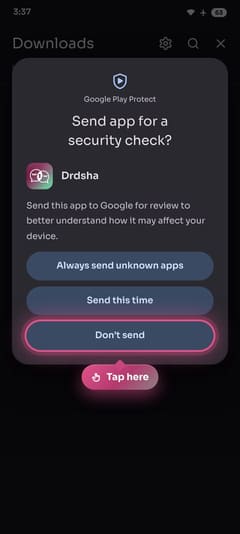
Choose Don’t send
If Android asks to send the app for a security check, tap Don’t send to continue installing.
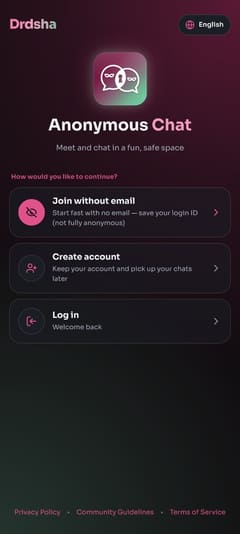
Open Drdshe & sign up
Launch the app, create an account or log in, confirm you’re 18+, and accept the policies. Then go online and start chatting.
Prefer not to install?
The web app works in any modern browser — the same chat, no download required.
Install questions
Quick answers to the questions people ask most.